Get Updates Via Email

Enter your email address:

Delivered by FeedBurner

About Me

facebook.com/Athul.Jayachandran twitter.com/athuljc

Followers

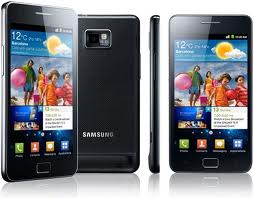
Samsung surpasses Iphone and Nokia in sales

Samsung Nokia Apple Iphone battle
The battle of Smartphones.
Samsung Galaxy S2
In the smartphones section,Samsung has overcome Apple's Iphone and Nokia's wide range of Smartphone in terms of sales.The huge demand for Samsung Galaxy series especially the Galaxy S II is said to be the reason.Samsung's move towards Android is looking to be a boost for them.Samsung is racing to reach with Nokia to become World's largest Handset makers.The korean based company's sales boosted up after it started selling the Galaxy S II, Which has the performance and features to stand up with Apple's Iphone.Samsung currently has a lot of mid budget smartphones available.

Facebook changes news feed settings, How to reset it

Since a few days i have been noticing that i hadn't been receiving news updates from some of my friends on Facebook.Usually i had been receiving status updates from them and yesterday i saw one of my status being updated but it was not showing up on my news feed.So i checked out the settings and found that Facebook had changed their settings in such a way that only news from the people whom you interact with the most are to be seen in your news feed page.Then i changed it back to normal again.

So here is how to do it, It's really simple.Follow these instructions :

1.Just go to the Facebook home page by clicking on the Facebook logo.
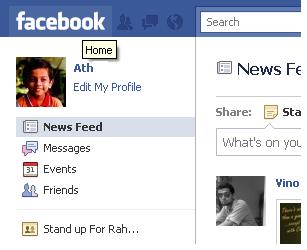
Go to Facebook Home page by clicking the Facebook Logo.


2.Just scroll down to the end of the page and click on the edit options link
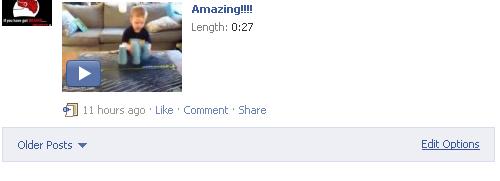
Find the edit options link


3.Now change the settings from 'Friends and pages you interact the most' to 'All your friends and pages'.
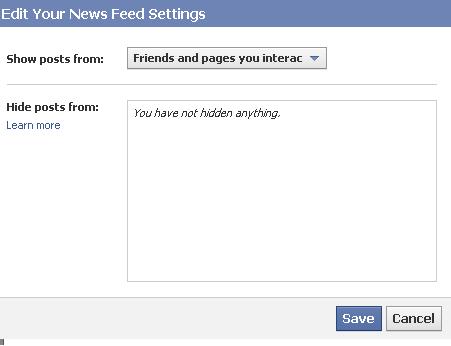
opening the edit options displays the above pop-up box.

4.Now just click save and go back to your News feed page and you can see updates from all.
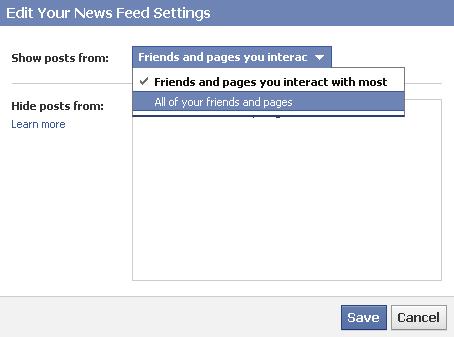
Just change it to 'All your friends and pages".

That's it you are done.Happy Facebooking folks :-)

Get a Mobile version of your Blogger blog


Here we bring you a very simple hack on how to activate mobile version of your blog.It is very easy and simple and just takes a couple of minutes.All you have to do is follow these four steps below.


  • If you haven't moved to Blogger in Draft then i say you do it right away,It is right their at the top near the sign out link.
  • Now go the settings page of your blog
  • Go to the Email & Mobile tab.
  • Now tick the option Yes and save the setting's.
Now all you have to do is add '?m=1' to your blog address and you can view the mobile version of your blog.

Via : Bforbloggerbeta: Enable mobile version of your blogspot blog

Multiple Google accounts login trick

Well most of you might have two google accounts and might have to switch between account's and have them opened up simultaneously.Now we have a tweak for the same.To get multiple google accounts to work on the same browser rather than having two browser's to do the trick.

We will give you a small step by step tutorial.It's really simple folks.


Google Account's page
Multiple sessions page
  • Now check on and Save.

That's it now you can get multiple account's on the same browser.Happy Browsing folks.Throw in your comments if this was of any help.


Universal Cell Phone charger coming soon

Yes,14 mobile phone companies have agreed to have a common phone charger so that their users wont have to go in search of a compatible charger while travelling or while at a place away from home.The companies include Blackberry,Nokia,Samsung,Apple etc.They signed the contract back in June 2009.The common charger will be of the type of a micro USB jack.The new charger will make life easier and reduce waste says the Vice President of the commissioner for industry and Entrepreneurship.The common charger is compatible with data-enabled mobile phones of various companies.The charger will roll out in the first quarter of this year.

Gmail account verification emails are fake


Over the past few months i have been receiving numerous emails that declare themselves to be from Gmail office and are demanding account details so that my account doesn't get suspended or canceled.They came from email accounts like acctaccess.verifying@gmail.com ,verify.finishacct@gmail.com and a few more.I had suspicion that this was not from Gmail as they don't usually does send such messages or verifications.I never replied thank god.

The emails look like this


We are shutting down some accounts due to congestion in our database system and your account was chosen to be deleted. If you are still interested in using our email service please click reply and fill in the space below for verification purpose:- 


Full Name:


Pasword:

Occupation:

Year of Birth:

State of Origin:


Note: This email is only for Gmail users (Users should reply within 48 hours to avoid "Permanently Lockup" Account)


Thank you for using Gmail 

The Gmail Team


I would recommend my readers and friends not to respond to such fake emails that are used to hack into our accounts.Don't reply and save yourself from the trap.Google never sends emails to verify account.


The best thing to do is to mark this as spam and hope that google sees it and blocks these accounts as soon as possible.Google are you listening?

Rapidshare.com introduces new changes - No more Captcha!

Finally Rapidshare is saying bye to its boring and tough captcha images(No longer will have to get confused over finding the cats),the file hosting giant announced the news yesterday on the website's news page.Even though they removed Captcha they have lowered the downloading speeds of free users too 500Kilobit/Second,and now Free users can upload files upto 200MB to Rapidshare,which used to 100MB earlier,


Rapidshare accounts
Screenshot -Rapidshare account details

New Changes:-
  • No Captcha for Free users.
  • Upload Limit increased from 100MB to 200MB.
  • Download Speeds reduced for free users.
  • No Time limit between Downloads.
Extract from Rapidshare website:

By eliminating the captchas we simplified the use of RapidShare's free services significantly. In addition, free-users can now upload and download bigger files (up to 200 megabyte). Anyhow, to protect RapidShare from congestion caused by automated downloading, we limited the maximum download speed for free users to 500 kilobit per second. To compensate for that, they do not have to wait anymore until starting a succeeding download.

Related Posts Plugin for WordPress, Blogger...

Search This Blog