Get Updates Via Email

Enter your email address:

Delivered by FeedBurner

About Me

facebook.com/Athul.Jayachandran twitter.com/athuljc

Followers

Showing posts with label Facebook. Show all posts

Number of shares a link has on Facebook

SharedCount - Track URL shares on Social Networks.

There was a lot of traffic coming from Facebook to one of my blogs, but the traffic sources would show either https://www.facebook.com/ or m.facebook.com. I had no idea of finding out how many people have shared or liked it on Facebook. My search ended at Quora, where users had listed out a few ways to find the solution. 

1. Take the link you want to check and append it behind http://graph.facebook.com/ , say the link is http://techno-geeks.blogspot.com/2013/06/fix-bsnl-broadband-dsl-link-problem.html we append it to the graph.facebook.com url, which makes it http://graph.facebook.com/http://techno-geeks.blogspot.com/2013/06/fix-bsnl-broadband-dsl-link-problem.html . Now open this link and facebook will show you how many times the link has been shared. The result would look like,

{
   "id": "http://techno-geeks.blogspot.com/2013/06/fix-bsnl-broadband-dsl-link-problem.html",
   "shares": 5
}
 
There is also another way, which is easier and more effective, You can use SharedCount service to check the link. The advantage of using ShareCount is that it not only shows you the number of Facebook shares, but also shares in other services like twitter, Google+, Pintrest, LinkedIn, Delicious and StumbleUpon. It still is not possible to exactly find out who or where the page has been shared.

Facebook careers in India - August 2012


The Social network giant Facebook is hiring proffessionals at Hyderabad, They are looking for people with atleast 1 year of experience and they are looking for people who are interested to learn and develop web applications and have worked on one. Facebook careers wrote,

" The Facebook Platform team needs people to support the developer community, enforce our policies, uncover abuse, and ensure the best possible Platform user experience. In this position, you'll interface with everyone from lone developers writing their first app to larger companies who have built businesses on Facebook Platform, while working closely with the Platform team. The Platform team is a tight-knit group encompassing all aspects of Platform, including engineering, business development, product management, policy, marketing, and technical support. This position is a full-time role that is located in our Hyderabad, India office. 


Responsibilities

  • Review applications to ensure good user experience
  • Investigate possible abuse, implement enforcements, communicate with developers
  • Discuss policy and product with developers and contribute to Facebook's decisions on changes
  • Identify trends to enhance the support process and improve team efficiency
  • Interface effectively with other teams
  • Creatively contribute to the Platform team's overall mission

Requirements

  • Excellent written and verbal English communication skills
  • 1 - 4 years of experience preferred
  • Bachelors degree or higher
  • Avid Facebook user essential
  • Critical thinker
  • Sound and responsible judgment
  • Strong attention to detail
  • Ability to multi-task and rapidly switch contexts
  • Familiarity with Facebook and Platform applications
  • Relevant developer relations experience a plus
  • Deeply understand Facebook Platform and possible integrations
  • Passionate about web technologies and hands on experience in building on one or more of them (Javascript, Flash, HTML5, etc)
  • Can work with product and engineering teams to drive bugs and product feature requests
  • Can work with Facebook developers to help with technical and implementation questions
  • Basic coding abilities (PHP, shell, UNIX and SQL) a plus
  • Experience in data/statistical modeling a plus

You can apply after you login to your facebook account here.

Microsoft Outlook Email Service - Features - Social Network friendly

Outlook.com login page.
Microsoft has not made a new email service, instead it has renamed it's very popular service Hotmail to Outlook, the name outlook is popular as it was the name of the desktop mail application that Microsoft provided with Windows. Now you must be wondering why Outlook could be different, well it is and i loved the simple and elegant interface, here are some reasons why you should consider getting an account at outlook.com,


  1. New design is elegant, simple, user friendly and uses 60% less pixels than before.
  2. Share documents like Word, Excel and Powerpoint presentations.
  3. Very Social Networking friendly.
  4. Integrates contacts from Facebook with Outlook.
  5. Photos on email can be viewed as a Slideshow.
  6. Users can chat with their Facebook friends from inside Outlook.com.
  7. One can view Facebook updates from friends on Outlook.com.
  8. Users can make Skype video calls and Chat inside Outlook.
  9. Mails sent to abc@hotmail.com, abc@live.com, and abc@msn.com can still be received at abc@outlook.com .
  10. Better sorting of mass email messages by itself.

User Interface of Outlook.com

Simple design of the UI is what impressed me the most. You can go to the Sign Up page and get your account right now, don't hesitate.


Microsoft Outlook.com Promo


courtesy: IBNlive.com

Don't use 'Verify your account' app on Facebook

The Secure and Verify request i received from two friends.
This is a kind reminder to everyone on Facebook not to use any application boasting to verify your account. Facebook verifies your account only by confirming your mobile number and they don't have any application for the same.

The verify your account and 'Secure and Verify' application takes you to a non-Facebook page, which is potentially unsafe as they can get details from your profile and you are also at the risk of losing your profile. They also send invitations to everyone on your Facebook profile.We are unsure whether Facebook has reviewed this application.

You can officially verify your facebook account with the help of this page at https://www.facebook.com/help/verify .

Facebook Security team with a few simple tips

As i logged into my Facebook account there was a highlighted part on my home page offering a few simple tips to protect and secure my password. I clicked on it and was forwaded to another page - Facebook Security Tips.

Facebook offering tips on the home page.


The security page of Facebook.
The security page on Facebook offers you a wide range of tips to secure your account and also a set of advanced tips to ensure your safety on the Social network giant.

Open Facebook via Linux terminal

Well i read this today from a friend who shared it on Facebook.A tutorial on how to use Facebook from a Linux terminal.


A majority of Linux users prefer sticking to their terminal rather than accessing through a GUI for most of their daily tasks. Have you ever wondered whether there is any way to access Facebook from terminal? The answer is Yes... Now, its possible to access Facebook from the terminal

 Read More: How to Use Facebook through command line.

Facebook also against SOPA and PIPA bills - Mark Zuckerberg

Mark Zuckerberg - The CEO and Founder of Facebook.
Mark Zuckerberg, The CEO of facebook also feels that SOPA and PIPA bills should be opposed.He says facebook opposes these two bills that will hurt the Internet.He stated this as a status update in his profile.Earlier Wikipedia protested against the bills. He was quoted saying


The internet is the most powerful tool we have for creating a more open and connected world. We can't let poorly thought out laws get in the way of the internet's development. Facebook opposes SOPA and PIPA, and we will continue to oppose any laws that will hurt the internet. The world today needs political leaders who are pro-internet. We have been working with many of these folks for months on better alternatives to these current proposals. I encourage you to learn more about these issues and tell your congressmen that you want them to be pro-internet.
The full version of Facebook's views against this bill can be read at https://www.facebook.com/FacebookDC?sk=app_329139750453932 .

Facebook changes news feed settings, How to reset it

Since a few days i have been noticing that i hadn't been receiving news updates from some of my friends on Facebook.Usually i had been receiving status updates from them and yesterday i saw one of my status being updated but it was not showing up on my news feed.So i checked out the settings and found that Facebook had changed their settings in such a way that only news from the people whom you interact with the most are to be seen in your news feed page.Then i changed it back to normal again.

So here is how to do it, It's really simple.Follow these instructions :

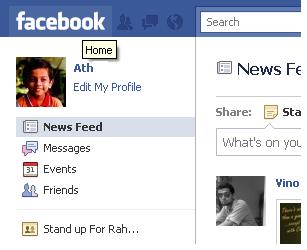
1.Just go to the Facebook home page by clicking on the Facebook logo.
Go to Facebook Home page by clicking the Facebook Logo.


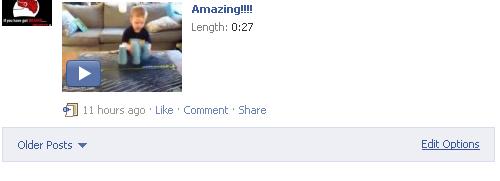
2.Just scroll down to the end of the page and click on the edit options link

Find the edit options link


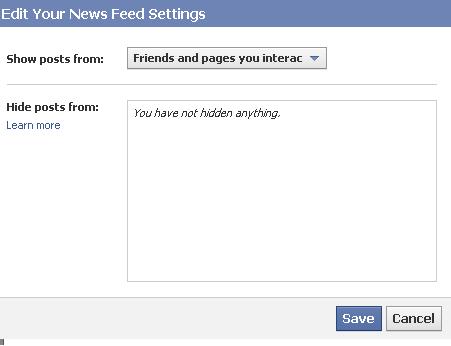
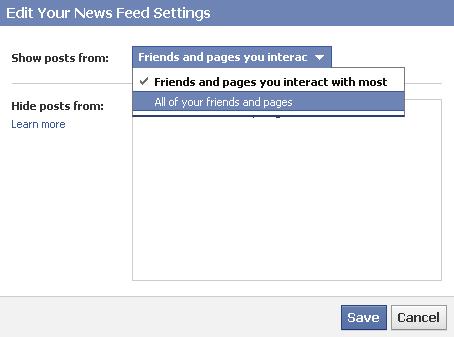
3.Now change the settings from 'Friends and pages you interact the most' to 'All your friends and pages'.

opening the edit options displays the above pop-up box.

4.Now just click save and go back to your News feed page and you can see updates from all.

Just change it to 'All your friends and pages".

That's it you are done.Happy Facebooking folks :-)

Related Posts Plugin for WordPress, Blogger...

Search This Blog